Maximizer CRM
Maximizer CRM
  • Home
  • About
  • Data Security
    • CyberVision
    • Mimecast
  • Resources
    • Articles
    • Case Studies
    • Datasheets
    • eBooks
    • MaxTips
    • Newsletters
    • Camsoft Solutions Humour
    • Videos
    • Webinars
    • White Papers
  • POPIA
    • FAQ
  • Contact Us
  • Blog
13th March 2015 by Maximizer CRM Blog in CRM

By Malik Naipal

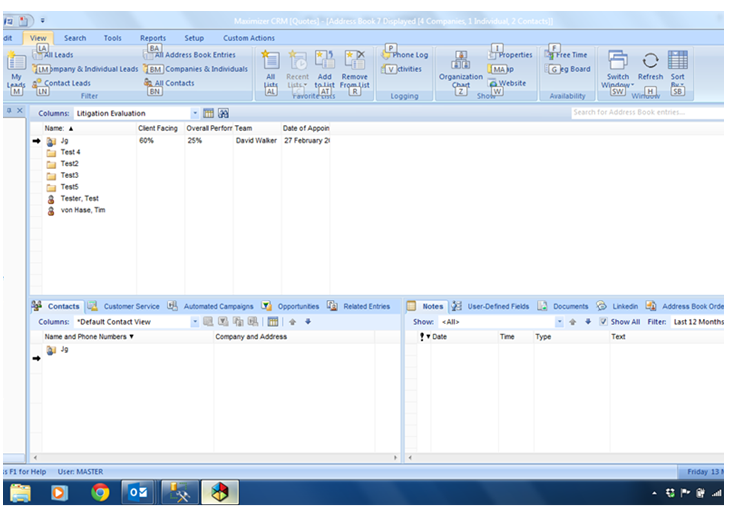
Some people prefer to use keyboard shortcuts rather than clicking with the mouse to access menu items. This is possible in the windows client of Maximizer. To do this, simply press the ALT button and letters and numbers will appear over each item on the ribbon menu. Press the letter or number you want and again items within that menu will appear lettered or numbered, and to select the item all you need to do is type the corresponding letter or number. The first screenshot below shows the result of the ALT key being pressed and the options that come up on the ribbon menu. The second screenshot is what comes up after selecting V for view.

0
Recommend
  • Facebook
  • Twitter
  • LinkedIN
  • Pinterest
Share
Tagged in
Leave a reply

Click here to cancel reply.

Categories

  • Cloud CRM
  • CRM
  • Customerisation
  • IoT and Security
  • Marketing
  • Max Sales Tips
  • Maximizer
  • Maxtips
  • Mobile CRM
  • Opinion Piece
  • Sales
  • Website
  • Work from home
Software Advice FrontRunners
How to Get More Customers – Winning Ways with CRM
Customer Growth
Customer Growth
Camsoft CRM Solutions achieves top performer in the EMEA region
An introduction to CRM – Part 1

Archives

  • March 2022
  • February 2022
  • January 2022
  • July 2021
  • June 2021
  • February 2021
  • October 2020
  • April 2020
  • November 2019
  • October 2019
  • September 2019
  • August 2019
  • July 2019
  • June 2019
  • May 2019
  • April 2019
  • March 2019
  • February 2019
  • January 2019
  • December 2018
  • November 2018
  • October 2018
  • September 2018
  • August 2018
  • July 2018
  • June 2018
  • May 2018
  • April 2018
  • March 2018
  • February 2018
  • January 2018
  • December 2017
  • November 2017
  • October 2017
  • September 2017
  • August 2017
  • July 2017
  • March 2017
  • November 2015
  • May 2015
  • April 2015
  • March 2015
  • February 2015
  • January 2014
  • December 2013
  • November 2013
  • October 2013
  • September 2013
  • August 2013
  • July 2013
  • June 2013
  • May 2013
  • April 201

CONTACT US

Jhb: (+27) 11 803-2316

CT: (+27) 21 797-4845

DBN: (+27) 31 825-3300

LDN: (+44) 758 521 6797

NZ: (+64) 223 991 074

info@maximizercrm.co.za

CRM for Sales

CRM for Marketing

CRM for Customer Service

Mobile CRM

Flexible, Customisable CRM

Features
Request a trial

Meet Maximizer 2021

Pricing

Integrations

Training

View our Privacy Policy and Terms of Service.
© 2021 All Rights Reserved. Camsoft Solutions, Certified Maximizer Solutions Provider.
Maximizer CRM